


Digital Banking makes it easier than ever to manage your finances anytime, anywhere.
From depositing checks with your phone to reviewing statements online, these tools help simplify everyday banking. They can also help protect you from fraud when used diligently. Here are a few simple ways to make the most of your Digital Banking experience while keeping your accounts secure.
Deposit checks safely.
 With mobile deposit, you can quickly deposit checks using your smartphone—saving you a trip to the bank. While it’s convenient, it’s important to follow a few best practices to protect your account:
- Endorse your check properly and include “For Mobile Deposit Only” when required.
- Deposit checks in a secure location using a trusted Wi-Fi network. Avoid public Wi-Fi when completing financial transactions.
- Keep the check until the deposit posts to your account, then securely shred it.
- Double-check the amount you entered before submitting the deposit.
These simple steps help ensure your deposit is processed correctly and reduce the risk of fraud or errors.
Set up account alerts to stay in control.
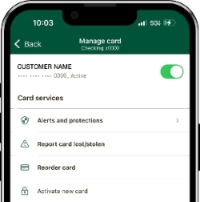
Account alerts are one of the easiest ways to stay informed about activity in your accounts. In Digital Banking, you can:
- Set balance and transaction alerts for things like large transactions, low balances, and deposits or withdrawals.
- Set spending limits on your debit card and choose to receive alerts or automatically block specific types of transactions.
Real-time alerts allow you to quickly spot unusual activity and act right away if something doesn’t look right.
Go paperless for secure statements.
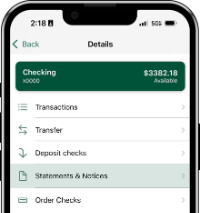 Paperless statements offer both convenience and added security. Instead of receiving sensitive financial documents in the mail, your statements are stored securely within your Digital Banking account.
Benefits of paperless statements include:
- Reduced risk of mail theft—fraudsters can’t intercept statements from your mailbox.
- Secure access anytime in Digital Banking.
- Easy organization and recordkeeping without stacks of paper.
You’ll still have full access to your statement history for up to 60 months—but with an added layer of protection.
See all your accounts in one place – even those with other banks.
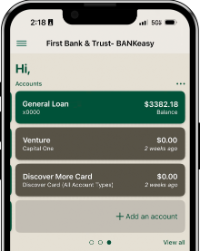 Link and display external financial accounts on your Digital Banking dashboard. You can link accounts from another bank, like checking, savings, credit cards, investment accounts, and loans. This feature gives you access to view your balances and, when available, transactions for accounts from other financial institutions, all within one tool.
By linking external accounts, you can:
- Monitor balances across institutions.
- Track spending and cash flow more easily.
- Stay organized with a centralized financial overview.
Just be sure to use strong passwords and enable security features like multi-factor authentication to keep your information protected.
Bank with more confidence, convenience, and control with Digital Banking. If you have questions about setting up these features, connect with a banker to help you get started.
*Available only for consumer accounts.